> For clean Markdown of any page, append .md to the page URL.
> For a complete documentation index, see https://contentful.com/developers/docs/llms.txt.
> For AI client integration (Claude Code, Cursor, etc.), connect to the MCP server at https://contentful.com/developers/docs/_mcp/server.

# Compose content model and SEO

> Learn about the fundamentals of the content model that powers Compose. Compose specific content types | Compose SEO content type and entry

> **Info**
>
> Compose is being deprecated. It is in maintenance mode and won’t be updated with any new features. Current installations will work until the end of 2026.

> **Info**
>
> This document describes Compose that is driven by a legacy content model. If you set up Compose after April 21st 2022, please refer to the updated [Compose documentation](/compose/what-is-compose).

## Structure of Compose content model

The image and explanations below describe the elements of the Compose content model and connections between them.

![Overview of the Compose content model](/developers/docs/_fern-img/f7d65b2dda16f76a40e3077af2d462e8508b753aeb7e89e2e7d74e48d1a86218.webp)

Compose content model consists of the following content types:

Compose: Page - represents a web page in Compose. This entry acts as a container for content and other page-related settings (such as the page title, slug and SEO metadata).

Compose: SEO - contains page SEO metadata and is linked to "Compose: Page" through SEO Metadata reference field.

**Page type(s)** - one or more custom content types – each with a custom set of fields – that define the content structure for different kinds of pages

## Compose specific content types

Compose requires two specific content types that define the structure of a web page and SEO metadata:

<table>
  <tr>
    <td>
      **Content type name**
    </td>

    <td>
      **ID**
    </td>
  </tr>

  <tr>
    <td>
      Compose: Page
    </td>

    <td>
      `page`
    </td>
  </tr>

  <tr>
    <td>
      Compose: SEO
    </td>

    <td>
      `seo`
    </td>
  </tr>
</table>

These content types are generated programmatically when setting up Compose in a space environment.

### Compose: Page

This content type represents a web page in Compose. It serves as an abstract entity containing common page-related information such as title, slug, SEO metadata and the actual content. Compose only lists the entries of the "Compose: Page" content type which can be edited in the page editor.

When building the frontend for a website the "Compose: Page" entries are the main entry point for fetching all the information that is required to render a page and its content.

The image below displays "Compose: Page" content type and the fields that it contains. Please see the table below the image for further explanations.
![Compose page fields](/developers/docs/_fern-img/9dedb6d2503fb6fde0e29323c2c1df057f81cf6555258bd1780be5558b56f24b.webp)

<table>
  <tr>
    <td>
      **Field ID**
    </td>

    <td>
      **Field name**
    </td>

    <td>
      **Description**
    </td>
  </tr>

  <tr>
    <td>
      `name`
    </td>

    <td>
      Internal name
    </td>

    <td>
      Name of the page. Used to identify the page in the page list and the Contentful web app.
    </td>
  </tr>

  <tr>
    <td>
      `title`
    </td>

    <td>
      Page title
    </td>

    <td>
      Will be displayed at the top of the page when published.
    </td>
  </tr>

  <tr>
    <td>
      `slug`
    </td>

    <td>
      Slug
    </td>

    <td>
      The last part of the URL for the page. Generated from "Page title" field.
    </td>
  </tr>

  <tr>
    <td>
      `seo`
    </td>

    <td>
      SEO Metadata
    </td>

    <td>
      Links an entry with SEO related configuration to the page.
    </td>
  </tr>

  <tr>
    <td>
      `content`
    </td>

    <td>
      Content
    </td>

    <td>
      Links a specific page type entry, e.g. "Landing page" or "Article page" to the page.
    </td>
  </tr>
</table>

The "Content" field links to a specific [page type](/compose/legacy/page-types) entry. Its validation must be configured to *accept specific content types* representing custom page types, e.g. "Landing page" or "Help Center Article". Compose uses this validation setting to determine the available page types when creating new pages.

### Compose: SEO

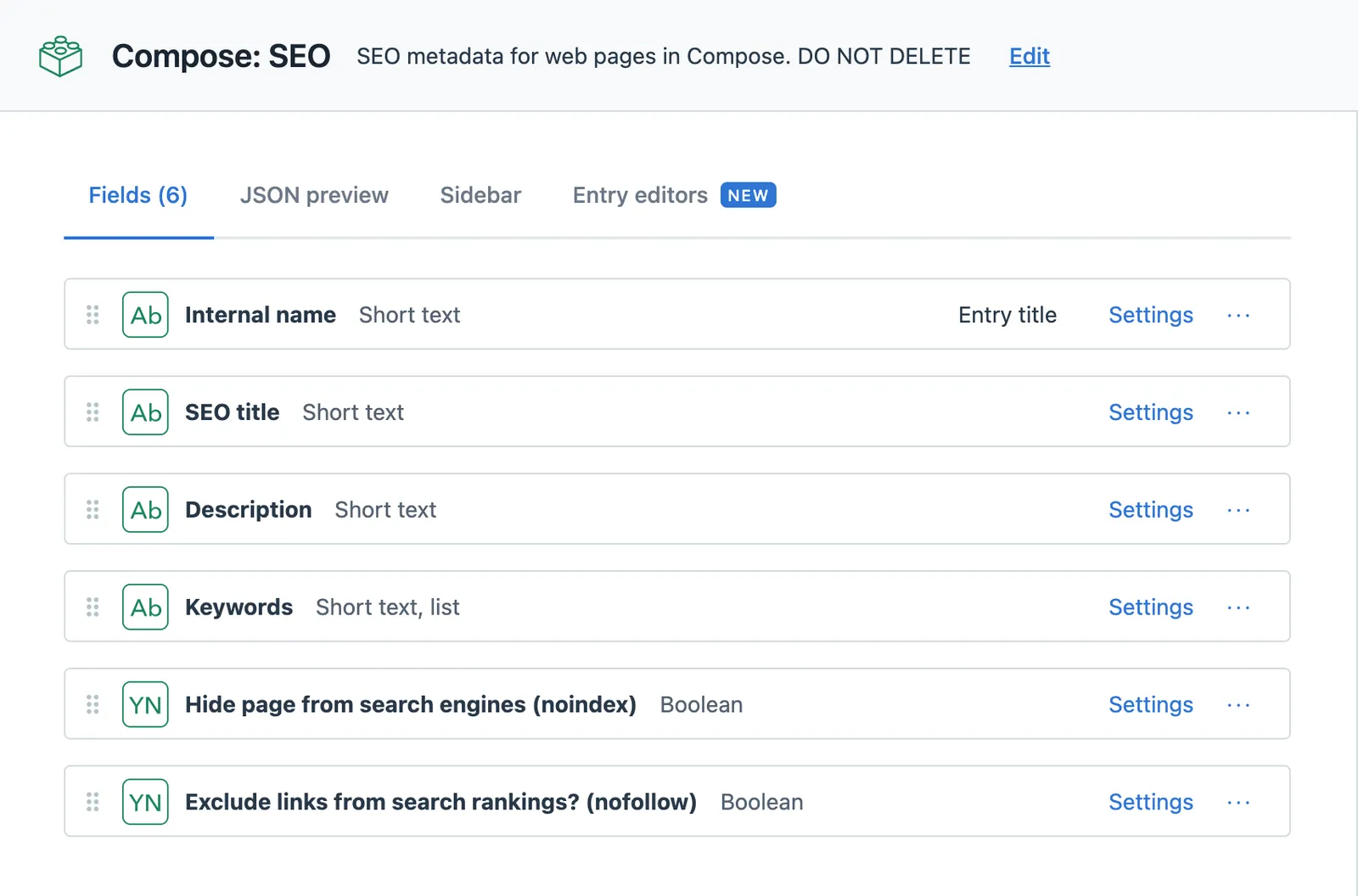
SEO-related page metadata are managed in an entry of the "Compose: SEO" content type. For each Compose page a "Compose: SEO" entry is automatically created and linked to the "SEO Metadata" reference field of the relevant "Compose: Page" entity.

To ensure that search engines can consume the SEO metadata, the frontend application needs to render the values in the corresponding HTML meta-tags. Check our [tutorial](/compose/legacy/building-a-website-with-compose-in-next-js) for an example on how to [render the SEO meta-tags](/compose/legacy/building-a-website-with-compose-in-next-js#rendering-metadata) for a website.

The image below displays "Compose: SEO" content type and the fields that it contains. Please see the table below the image for further explanations.

![Compose SEO fields](/developers/docs/_fern-img/fe02c2e1cc655f34612cc354fade81802e16700d4ed36ac4a05253d6fd8dbbaa.webp)

<table>
  <tr>
    <td>
      **Field ID**
    </td>

    <td>
      **Field name**
    </td>

    <td>
      **Description**
    </td>
  </tr>

  <tr>
    <td>
      `name`
    </td>

    <td>
      Internal name
    </td>

    <td>
      Autogenerated display name.
    </td>
  </tr>

  <tr>
    <td>
      `title`
    </td>

    <td>
      SEO Title
    </td>

    <td>
      SEO optimized page title. Should be rendered in the 

      [\<title> tag](https://moz.com/learn/seo/title-tag)

      .
    </td>
  </tr>

  <tr>
    <td>
      `description`
    </td>

    <td>
      Description
    </td>

    <td>
      [Meta description](https://moz.com/learn/seo/meta-description)

       of the page: A brief summary of the web page that often is displayed in search engine results.
    </td>
  </tr>

  <tr>
    <td>
      `keywords`
    </td>

    <td>
      Keywords
    </td>

    <td>
      Page related SEO keywords.
    </td>
  </tr>

  <tr>
    <td>
      `no_index`
    </td>

    <td>
      Hide page from search engines (noindex)
    </td>

    <td>
      Values are 

      `true`

      , 

      `false`

       or empty. Should be used for 

      [Robots meta directives](https://moz.com/learn/seo/robots-meta-directives)

      .
    </td>
  </tr>

  <tr>
    <td>
      `no_follow`
    </td>

    <td>
      Exclude links from search rankings (nofollow)
    </td>

    <td>
      Values are 

      `true`

      , 

      `false`

       or empty. Should be used for 

      [Robots meta directives](https://moz.com/learn/seo/robots-meta-directives)

      .
    </td>
  </tr>
</table>

The "name" field is used by Compose to programmatically assign the internal name of the containing page to the entry by using following convention:
`{Internal name of page} - Compose: SEO`

Example:

<table>
  <tr>
    <td>
      **Internal name of page**
    </td>

    <td>
      **Applied name**
    </td>
  </tr>

  <tr>
    <td>
      Introduction to Contentful
    </td>

    <td>
      Introduction to Contentful - "Compose: SEO"
    </td>
  </tr>
</table>

This makes it easy to see to which page the "Compose: SEO" entry belongs to in the Contentful web app or in the Launch app.

> **Info**
>
> Since the "name" field is programmatically managed it does not appear in the Compose UI. If the containing "Compose: Page" entry is renamed using the web app or the API the changes won’t be reflected until the page is reloaded into the page editor in Compose.